SMS Messaging & Opt-In
Last Updated: September 23, 2026
SocialLoop Experiences Corporation ("SocialLoop") operates an event platform where hosts create events and the people who attend them receive event-related text messages. This page explains exactly what we send, how you opt in and give consent, and how to opt out at any time.
Looking for optional community news and invitations? See the separate community text subscription program.
Want to talk with SocialLoop by text, to find events, check tickets or run your own? See Text SocialLoop.
About SocialLoop
SocialLoop Experiences Corporation operates socialloop.ai. Hosts use our platform to create event pages, offer free RSVPs or paid tickets, manage guest lists, and communicate with their attendees. Guests use SocialLoop to register for events, access their tickets, and receive updates about events they join.
Learn more about our company and hosting tools. For account, event, or messaging support, visit Support or email support@socialloop.ai.
Who sends the messages
Messages are sent by SocialLoop on behalf of the event organizers whose events you join. They come from a SocialLoop business number. This event program does not send promotional blasts and does not send messages on behalf of unrelated third parties.
How you opt in
This page and the consent screenshot below are public. You do not need to sign in, enter a phone number, or receive a verification code to view them.
To view the phone enrollment form without an account, open socialloop.ai, choose Sign In, then Continue with phone. The phone field and SMS disclosure are visible before you submit your number or a verification code.
You provide your mobile number and give consent to receive texts through these account and event registration paths:
- When you create a SocialLoop account — the sign-in screen where you enter your phone number displays a clear disclosure stating that, by continuing, you agree to receive SocialLoop text messages, with a link to our Terms and Privacy Policy.
- When you RSVP to or buy a ticket for a specific event — you sign in (providing your number) to register, and the same disclosure is shown before you submit.
- When you create an account with Google or Apple — the profile form has an optional phone number field with the same SMS disclosure directly beneath it. You can leave that field blank and continue without providing a mobile number.
Phone opt-in screen
Actual SocialLoop phone form, captured on September 23, 2026 while signed out. The number field is empty. The disclosure, Terms, and Privacy Policy are visible before the user enters a number and selects Continue to request a verification code.
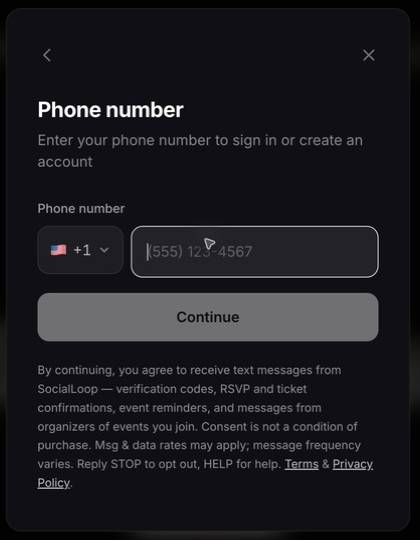
The exact disclosure shown at the point you provide your number reads:
"By continuing, you agree to receive text messages from SocialLoop — verification codes, RSVP and ticket confirmations, event reminders, and messages from organizers of events you join. Consent is not a condition of purchase. Msg & data rates may apply; message frequency varies. Reply STOP to opt out, HELP for help."
Consent to receive marketing or event texts is never a condition of purchasing tickets or using SocialLoop.
What we send
- Account verification (one-time passcodes) and security notifications
- RSVP and ticket purchase confirmations, including your ticket link
- Event reminders and day-of logistics for events you've joined
- Messages an event's organizer sends to their own confirmed attendees
Example messages:
- SocialLoop: You're confirmed for Sunset Rooftop Mixer on Fri, Jun 26. Your ticket & details: https://socialloop.ai/loops/abc123 — Reply STOP to opt out, HELP for help.
- SocialLoop: Reminder — Sunset Rooftop Mixer is tomorrow at 7:00 PM, The Highline. Your ticket: https://socialloop.ai/loops/abc123 — Reply STOP to opt out.
Message frequency & rates
Message frequency varies based on your event activity. You may receive up to 15 messages per month depending on the events you join and their reminders. Message and data rates may apply. Supported carriers include all major US carriers.
Opt out & get help
- Opt out: Reply STOP to any message to unsubscribe from all future SocialLoop texts. You'll receive a one-time confirmation.
- Help: Reply HELP for support, or email support@socialloop.ai.
- Re-subscribe: Reply START to resume receiving messages.
Opting out of SMS does not affect push notifications or email, which are managed separately.
Privacy
Your mobile information and SMS consent are never shared, sold, or rented to third parties for their own marketing. See our Privacy Policy and Terms of Service for full details.